How Early Computers Worked
The earliest computers did not process photographs, documents, or web pages. They processed encoded quantities: holes in cards, electrical states, paper-tape characters, or pulses held in a circuit. A card reader could treat a hole as 1 and an unpunched position as 0, while an electronic circuit could represent a number with voltage states. Hollerith’s machines were used for the 1890 census and accomplished in one year what would have taken nearly ten years of hand tabulating for the 1880 census. That work was mechanized data handling, not yet a general-purpose computer.
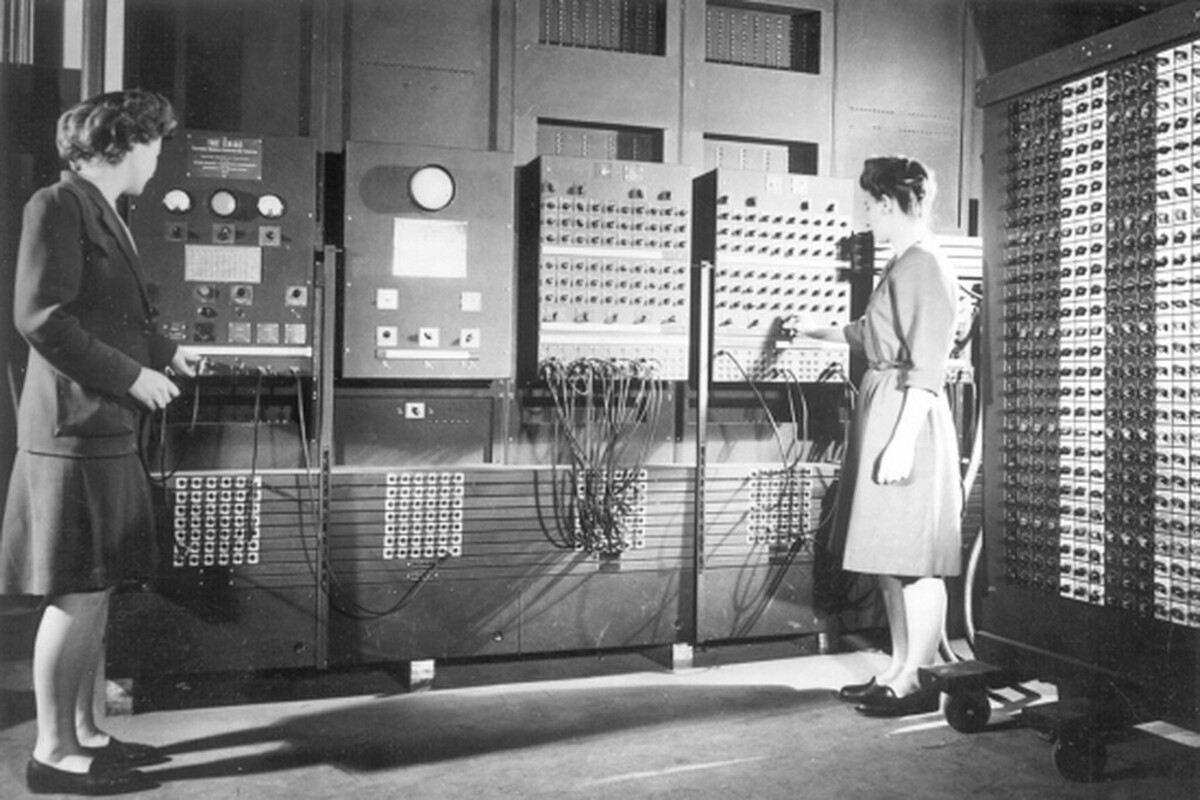
Electronic machines arrived in the 1940s. ENIAC, completed at the University of Pennsylvania in 1946, used about 18,000 vacuum tubes and occupied more than 1,000 square feet. It performed arithmetic through electronic circuits, but operators set its task with cables and switches. The Manchester Small-Scale Experimental Machine, called the Baby, ran a 17-instruction program from electronic memory on June 21, 1948. That distinction—circuits that calculate versus a machine that stores instructions—explains the central change in early computing.
A useful way to follow the process is to separate four jobs. Input converted a human record into a machine-readable pattern. Logic and arithmetic changed that pattern according to rules. Memory held numbers or instructions long enough for the next operation. Output converted results into cards, tape, print, a display, or a set of lights. Early machines performed all four jobs, but each used different physical parts and had its own failure points.
Where Processing Went Wrong
Input was often the first source of trouble. A misplaced punch could turn a person’s age, a payroll amount, or a scientific value into a different code. Cards had to arrive in the correct order, and a damaged edge could cause a reader to misfeed. Clerks also had to translate marks on paper into columns and holes, so a machine could repeat a human transcription error at high speed.
Programming created another bottleneck. On ENIAC, a new calculation might require changing patch cables and setting banks of switches. The arithmetic circuits were fast once configured, yet the preparation could take days. A machine could therefore spend much of its working life waiting for people to specify the next sequence of operations.
Memory was difficult for physical reasons. A delay line held pulses moving through a medium, so the desired value arrived only at a particular time. A magnetic drum waited for the right spot to rotate under a reading head. A Williams tube stored electrical charge on a cathode-ray-tube screen, but charge leaked and had to be refreshed. A result was useful only if the machine could find it, preserve it, and distinguish it from neighboring values.
Reliability added a further limit. Vacuum tubes could fail, connections could loosen, and heat filled the room. Operators used test routines, spare parts, logs, and repeated runs to separate a faulty calculation from a faulty component. Early computers were fast calculators surrounded by careful procedures; their results depended on the entire chain, not just the central arithmetic unit.
Build A Processing Chain
Encode The Input
Start by asking what the machine actually receives. A punched-card installation receives positions and holes, not the meaning “salary” or “birth year.” A reader closes electrical contacts where pins pass through holes, turning a physical pattern into pulses. Hollerith’s census process used separate stages for punching, reading, counting, and sorting. That separation made the work inspectable: a card could be checked before it entered the counter.
For a historical example, treat a four-column record as four binary decisions. A hole in a chosen position closes a circuit; no hole leaves it open. Groups of positions can encode decimal digits, letters, or categories. The result is not a number until the machine’s wiring assigns meaning to the pattern. Checking card order, punch position, and reader alignment catches errors before arithmetic begins.
Represent Each Value
Choose the representation before explaining the calculation. ENIAC used decimal arithmetic, with electronic counters for digits from 0 through 9. Other machines favored binary because two stable states map neatly onto switches, relays, and tube circuits. Binary is not magic shorthand: the machine still needs rules for place value, sign, overflow, and the location of each word.
A binary word such as 1011 can represent eleven when its positions carry weights 8, 4, 2, and 1. The same pattern could mean a letter or an instruction if the surrounding rules assign a different role. This is why input codes, instruction codes, and numerical formats must agree. A punched tape can be physically correct while the program interprets its characters incorrectly.
Run Logic And Arithmetic
Arithmetic units combine simpler operations. An adding circuit compares incoming states, produces a result state, and passes a carry to the next position. Repeating that action across a word creates addition; subtraction can use complements and addition. Registers hold the immediate operands and result, while control circuits decide which operation happens next.
Early control systems often stepped through a fixed sequence of pulses. A counter selected the next stage, and switches or wiring determined the path. When a program lived in memory, the control unit could fetch an instruction, decode its operation and address, execute it, and move to the next instruction. The cycle sounds familiar because later machines retained this arrangement, though their parts became smaller and more reliable.
Store And Retrieve Results
Storage must preserve both content and location. Manchester’s Williams-Kilburn tube used a cathode-ray-tube screen to hold charge patterns; the Baby’s store held 2,048 bits. A reading circuit detected the pattern, while refresh action restored charge that would otherwise fade. This was a practical demonstration of random access: the control system could address a selected word instead of waiting for a complete reel or drum rotation.
Use a storage map when examining an early program. Mark which locations contain instructions, which contain numbers, and which receive results. The Baby’s first successful program searched for the highest factor of a number; the machine ran it from memory rather than requiring a new cable arrangement for every step. That arrangement reduced setup work, even though entering or checking the bit pattern remained laborious.
Two Early Processing Cases
Imagine an anonymized census office in 1890. Clerks transfer questionnaire answers to cards, one card per household or person. A reader detects holes and sends electrical pulses to counters; a sorter routes cards into groups such as age bands or occupations. Supervisors can inspect cards and totals at each stage. The system handles large volumes because each card carries a repeatable code, not because the machine understands a household’s story.
Now imagine a Manchester laboratory in June 1948. Researchers load a short pattern of instructions into the Baby’s memory, place a number in another location, and start the machine. The control circuits fetch an instruction, perform a subtraction or comparison, store the result, and branch back when the condition requires another pass. The first successful program tested the machine by seeking a highest factor. Its 17 instructions were tiny by later standards, yet they proved that data and instructions could share electronic memory.
These cases show two paths into computing. Card equipment excelled at repeated counting and sorting with human-prepared records. The Baby excelled at changing the order of operations through instructions held inside the machine. Neither removed human judgment: people chose categories, formats, procedures, and checks.
Compare Processing Methods
| Method | Physical Form | Best Fit | Main Limit |
|---|---|---|---|
| Punched cards | Holes read as contacts | Counting and sorting records | Manual entry and card order |
| Plugboards and switches | Cables and set controls | A fixed, high-speed sequence | Slow task changes |
| Delay-line memory | Timed pulses in a medium | Compact sequential storage | Access waits for timing |
| Williams tube | Charge on a CRT screen | Stored instructions and data | Charge leakage and refresh |
A practical checklist follows from the comparison: identify the input code; confirm the order of records; document the number format; mark instruction and data locations; verify one intermediate result; and inspect the output format. The checklist applies to a card sorter, a relay calculator, or the Baby because each system can fail at a boundary between human meaning and machine state.
Mistakes That Mislead
Calling every early calculating device a computer hides the difference between a fixed calculator and a stored-program machine. A device may perform arithmetic electronically while still needing its operations set by wires or switches. Ask how a new sequence entered the system before assigning it the word “programmable.”
Another mistake is treating binary as the whole explanation. Binary describes the state representation, but processing also needs timing, addresses, instructions, carry rules, and output conventions. A reader who sees a row of lamps must know which lamp is the highest-order bit and when the result is valid.
It is also easy to compare clock speed alone. A faster arithmetic circuit may spend more time waiting for a drum, card reader, operator, or input conversion. Report the complete path: preparation time, calculation time, storage access, checking, and output. This gives a fairer picture of what early machines achieved.
Finally, avoid presenting a single inventor as the whole story. Hollerith’s cards, ENIAC’s electronic arithmetic, and Manchester’s stored memory solved different problems. Their dates overlap with earlier relay, mechanical, and analog work. A careful account names the particular first being discussed—first large electronic calculator, first stored-program run, or first commercial system.
FAQ
How did early computers represent information?
They used physical states such as holes, switch positions, electrical pulses, magnetic patterns, or charges on a screen. Circuits and programs assigned those states meanings such as digits, instructions, or characters.
Were the earliest computers binary?
Not all of them. ENIAC used decimal arithmetic, while many later electronic designs used binary because two-state circuits were practical to build and control.
How was ENIAC programmed?
Operators configured its operation with patch cables, switches, and function settings. Changing a task could require extensive rewiring, even though its arithmetic ran electronically.
What did the Manchester Baby prove?
On June 21, 1948, it successfully ran a 17-instruction program stored in electronic memory. The demonstration showed that instructions and working data could reside inside the same machine.
Why did early computers need so much checking?
Input errors, timing faults, tube failures, memory leakage, and misordered cards could all change a result. Checks at each stage helped operators locate the fault instead of trusting a plausible number.
Author's Insight
The history of early computers is best read as a history of boundaries: paper became code, code became electrical states, and electrical states became controlled operations. The stored-program idea mattered because it moved part of the procedure from the operator’s wiring bench into memory. That change did not erase hardware limits; it made the sequence of operations easier to alter and inspect. The enduring lesson is to ask how information is represented, moved, stored, and checked at every stage.
Key Takeaways
Early computers processed information by assigning meaning to physical states and moving those states through input, logic, memory, and output stages. Punched cards supported large-scale counting and sorting; vacuum-tube circuits made arithmetic fast; stored memory made instruction sequences easier to change. The Manchester Baby’s 1948 run marked a turning point, but its 2,048-bit store and fragile tube circuits also show the limits of the period. Understanding those trade-offs makes the development of later computers easier to follow.